Gulfstream Aerospace
·2019

Gulfstream
My Cabin

A digital experience that puts complete control of the aircraft environment into the hands of passengers and crew — from lighting and temperature to entertainment and real-time flight data.
Product DesignUX ResearchiOS AppWearablesAndroidLuxury AviationIn-Flight Systems
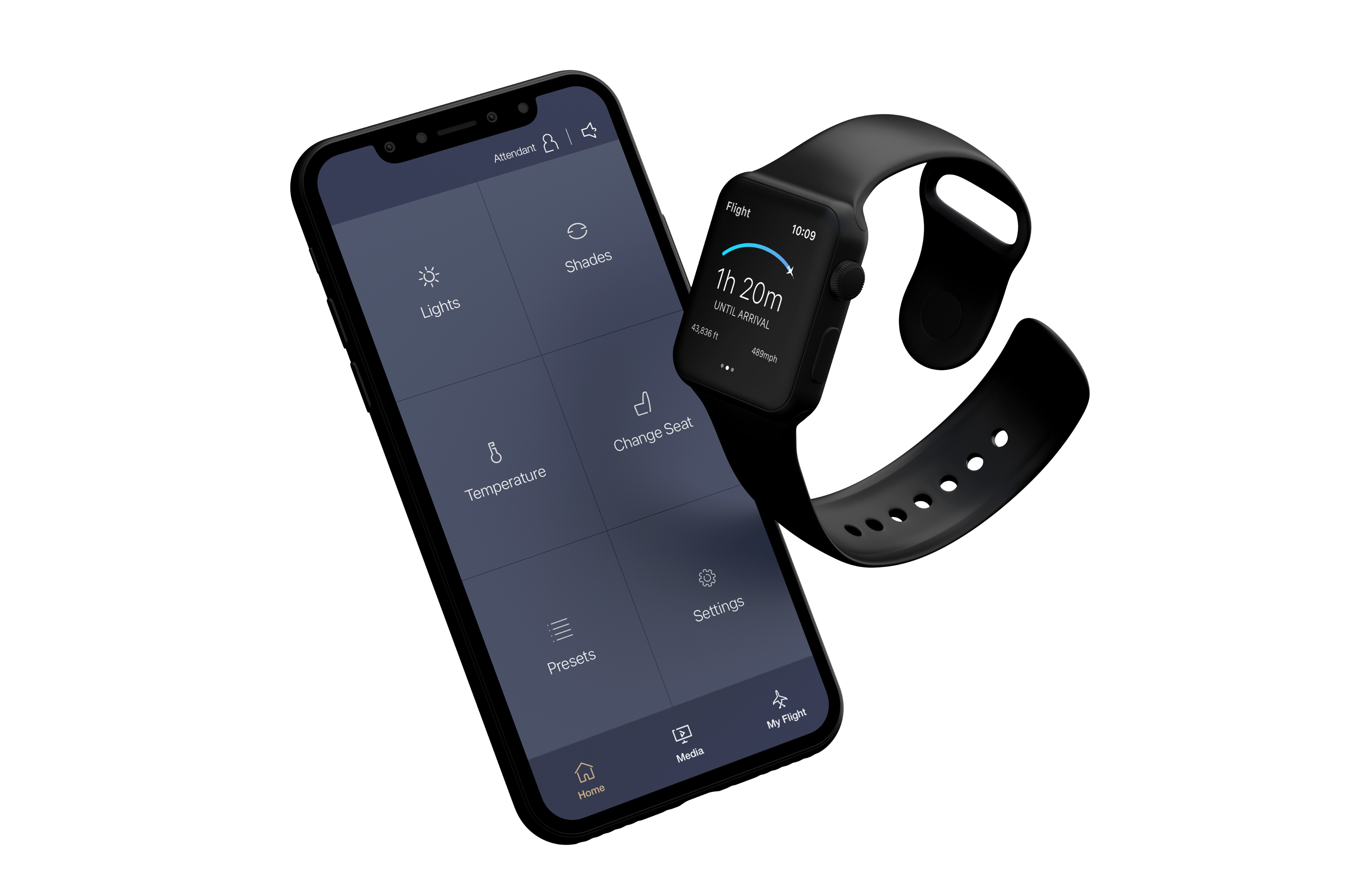
Gulfstream My Cabin — PCU iPhone showing cabin controls alongside Apple Watch
Available now on the App Store
Gulfstream My Cabin
The passenger control unit app this case study is about — download it directly from the iOS App Store.
Download on iOS

Overview

A new standard for in-flight experience

The Gulfstream My Cabin application is a comprehensive digital control platform designed for use on Gulfstream's fleet of ultra-long-range business jets. It transforms how passengers and crew interact with the aircraft environment — replacing legacy physical panels with an elegant, touch-first interface that manages everything from cabin lighting and temperature to entertainment systems and real-time flight information.

The project encompasses three interconnected features within a single My Cabin ecosystem: the core tablet and phone interface (GTS + PCU), an in-app My Flight experience for real-time flight tracking, a Lighting control system unlike anything in business aviation, and a Wearable companion for crew on Apple Watch. Together they form a cohesive platform that redefines luxury air travel management.

3
Form factors: GTS galley display, PCU phone app, Apple Watch wearable
6+
Aircraft systems integrated into a single interface
NPS
Customer satisfaction as primary success metric across the platform
2019
Design and delivery year — iOS app live on the App Store
Disclaimer

In compliance with my non-disclosure agreement, I've omitted and generalised certain confidential information from this case study. The insights, design rationale, and research findings shared here are my own and don't necessarily represent the views of Gulfstream Aerospace.

Context

Luxury, re-platformed

Gulfstream aircraft represent the pinnacle of business aviation — commanding multi-million dollar price points and serving a clientele that expects nothing short of perfection. Yet the cabin management experience lagged behind: physical control panels were fixed in location, required crew intermediation for simple tasks, and offered no personalisation. The opportunity was clear.

The team partnered with Gulfstream to design and develop a modern, touch-based cabin management system spanning multiple aircraft from their fleet — on iPads, Android tablets, iOS and Android phones, and Apple Watch — all while conforming to the exacting brand standards of one of aviation's most prestigious names. View the full Gulfstream fleet →

Large-Cabin Aircraft

Gulfstream's large-cabin flagship models required a comprehensive layout-aware control system, with zone-based management for lighting, temperature, and entertainment across up to four distinct cabin zones plus galley and lavatory areas — supporting up to 19 panoramic oval windows and multiple living areas.

Super Midsize & Midsize Aircraft

Smaller-cabin variants in the fleet demanded a parallel but distinct interface, adapted for a different cabin footprint and passenger configuration — ensuring the design system was flexible enough to serve the full range of Gulfstream models without compromise on experience quality.

The My Cabin system interfaces directly with the aircraft's avionics and cabin management hardware, meaning design decisions carried real-world consequences. A confused crew member on a transatlantic flight cannot call support. The UX had to be effectively self-evident.

The Challenge

Designing for the world's most demanding passengers

The design challenge was not simply to digitise existing physical controls. It was to reimagine the entire experience of being on a private jet — making crew more effective, passengers more empowered, and the overall cabin atmosphere feel like an extension of the Gulfstream brand: precise, effortless, and premium.

01

Dual-user mental models

The application serves two fundamentally different users simultaneously: crew members who need operational efficiency and full system access, and passengers who need effortless, curated control over their personal comfort. These users have opposing mental models — crew think in systems, passengers think in outcomes. A single interface had to serve both without confusing either.

02

Environment-aware design constraints

Aircraft cabins operate in unusual conditions: variable lighting from near-dark to direct sunlight through oval windows, turbulence-induced hand instability, the psychological context of altitude and pressure, and the need for crew to perform tasks rapidly while standing. Standard mobile HIG assumptions did not apply.

03

Real-time system feedback at altitude

Every action in the app triggers a physical change in the aircraft — lighting shifts, temperature adjusts, window shades move. The UI had to communicate system state accurately and immediately, with graceful handling of latency, partial updates, and hardware edge cases where a commanded change might not immediately reflect in the aircraft state.

04

Regulatory and safety context

Certain controls — particularly those that intersect with safety systems — required crew-only access with appropriate confirmation patterns. The design had to enforce role-based access clearly without creating friction for legitimate crew actions, and without inadvertently surfacing restricted controls to passengers in a way that felt exclusionary.

05

Cross-platform coherence

The design system had to work across iOS and Android tablets, iOS and Android phones, and Apple Watch — five distinct form factors with different screen sizes, interaction models, and OS conventions — while maintaining a single, coherent Gulfstream brand experience across all of them.

My Role

Lead Product Designer

I led product design across the full Gulfstream My Cabin ecosystem — from initial discovery and concept through to engineering handoff and App Store delivery. My scope covered the core cabin management application, the wearable companion app, and the My Flight passenger experience, as well as the underlying design system that tied all three surfaces together.

3
Product surfaces designed end-to-end
5+
Device targets: iPad, Android tablet, iPhone, Android phone, Apple Watch
2
Aircraft variants: GTS and G280
1
Unified design system spanning all surfaces and variants

Cross-functional partners

Gulfstream UX Team

Core client stakeholders providing domain expertise, aircraft system knowledge, and approval authority for design directions and brand alignment.

Engineering Team

iOS, Android, and systems engineers translating design specifications into production code, with close collaboration on hardware interaction patterns.

Cabin Systems Integration

Aircraft systems specialists who defined the data contracts between the app and the aircraft's cabin management hardware — essential for real-time feedback design.

Avionics & Connectivity

Specialists ensuring the app's communications architecture aligned with aircraft network topology and latency characteristics at altitude.

Brand & Visual Design

Gulfstream brand team ensuring every visual decision — color, typography, icon weight, motion — aligned with the luxury aviation positioning of the product.

UX Research & Testing

Usability studies conducted with crew representatives and frequent private aviation passengers to validate interaction patterns across the full ecosystem.

My Cabin Application

Control at your fingertips

The My Cabin application is the operational heart of the experience — a full-featured cabin management system that spans three distinct form factors, each purpose-built for a specific user and context. Together they form a unified ecosystem: same visual language, same design system, same controls — adapted to the realities of how each person interacts with the aircraft.

GTS — Galley Touchscreen

Custom, certified 10.1" touchscreens embedded in the galley and vestibule of the aircraft. Used primarily by trained crew, the GTS exposes the full depth of the system: lighting, climate, entertainment, electrical systems, critical water systems, internet usage, and advanced crew-only controls. The GTS is the operational command centre of the cabin.

PCU — Personal Control Unit

The passenger-facing application available for download on the iOS App Store. Designed for passengers' own iPhones and iPads (and Android), the PCU gives travellers curated control over their personal environment — lighting mood, seat preferences, temperature, and entertainment — without requiring crew intermediation.

Wearable — Apple Watch

A companion app for crew worn on the wrist during flight. The wearable surfaces flight status, real-time system alerts, attendant call notifications, and destination weather — giving crew situational awareness without returning to the galley or retrieving a tablet. Designed for immediacy, not depth.

Light & Dark Mode

All three surfaces — GTS, PCU, and Wearable — support both Light Mode and Dark Mode, with an Auto setting that follows device system preferences. Aircraft cabin lighting conditions vary enormously across a flight, from bright daylight at the oval windows to near-complete darkness during sleep phases. A dark-adapted crew member at 2am should not be hit with a white UI flooding the cabin. The design system was built from the ground up to support both themes with equal visual quality — using the deep navy-and-gold palette in dark mode and a clean light-surface treatment in light mode, with no token compromises between them.

Core Product · GTS + PCU

A whole aircraft, one screen

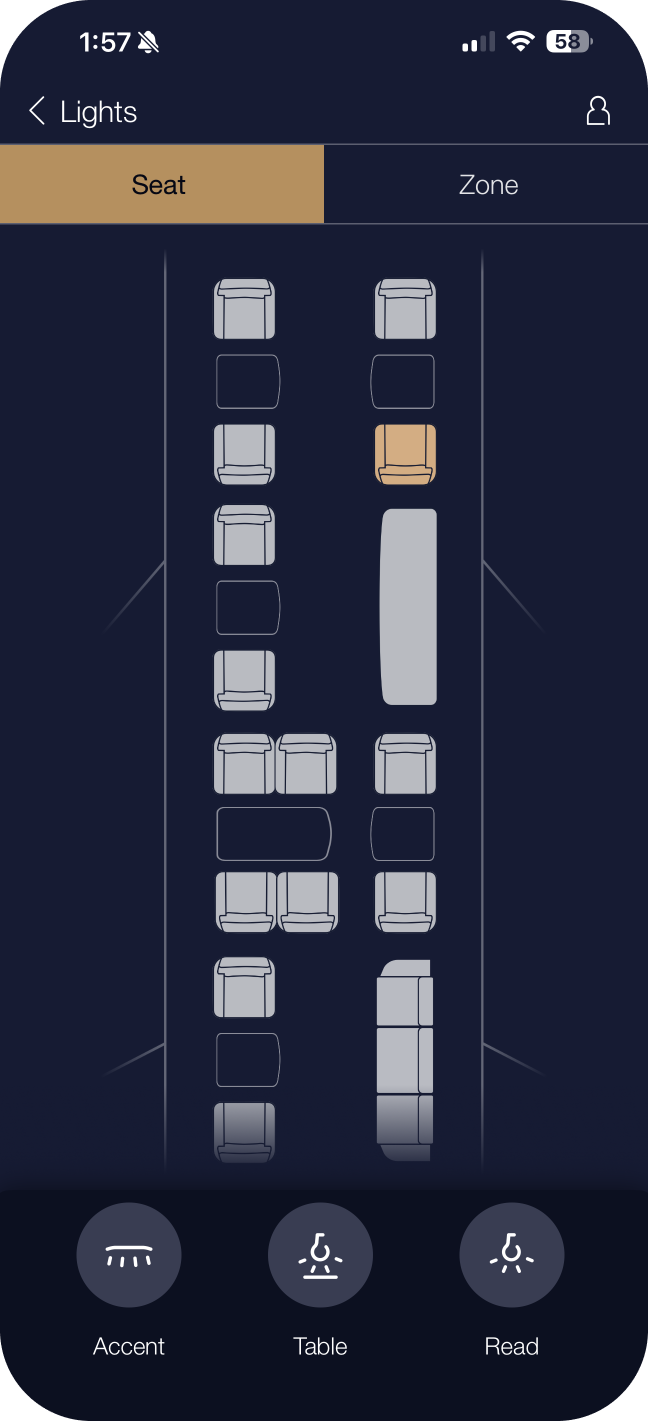
Seat lighting control screen
Seat Lighting
Individual seat-level brightness and color temperature, with warm-to-cool swatch selection per passenger position.
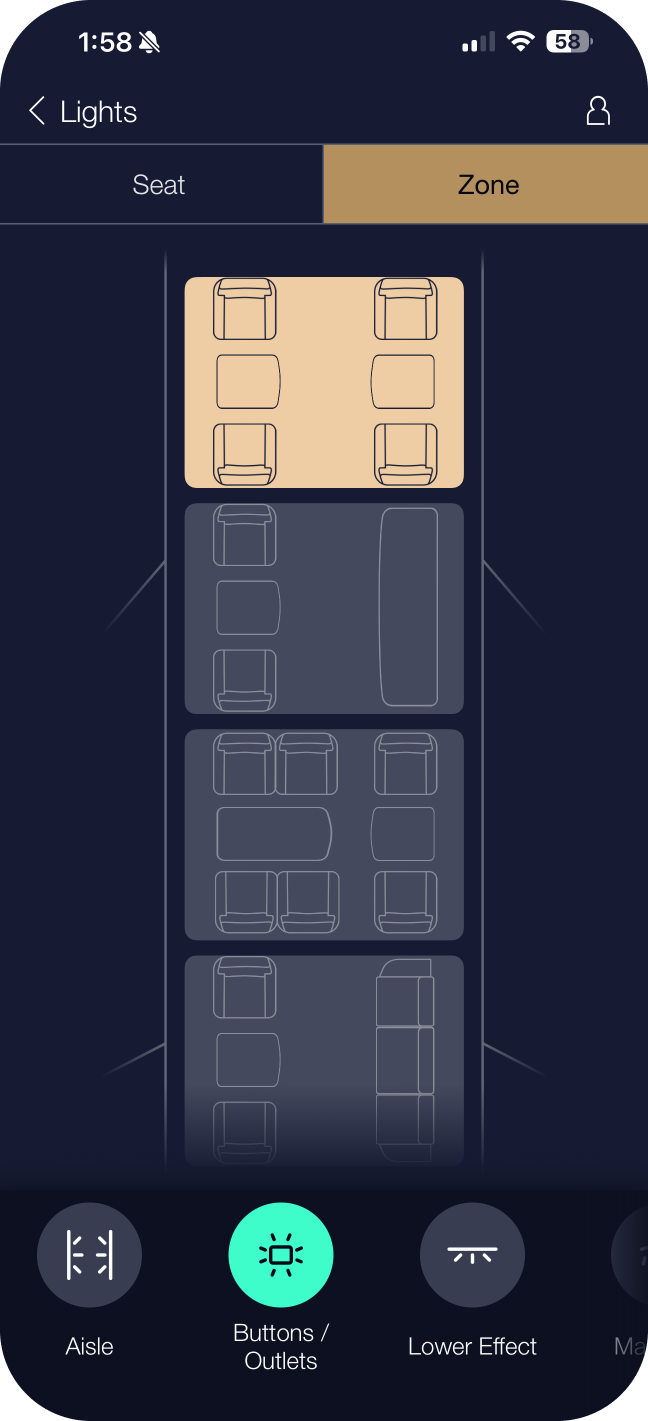
Zone lighting control screen
Zone Lighting
Zone-wide lighting control across the cabin floor plan, with tap-to-select zones and cross-zone blend transitions.
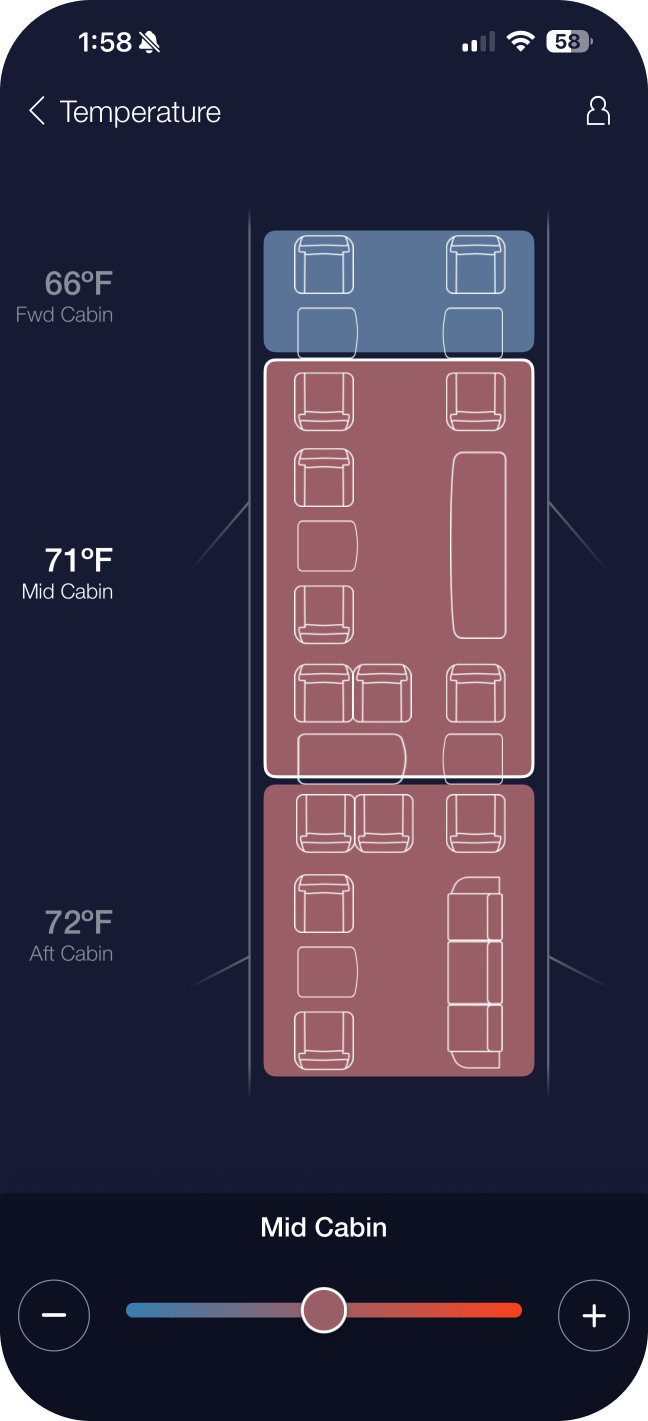
Temperature control screen
Temperature Controls
Per-zone climate management with heat-map overlay. Steppers replace sliders for precision adjustment in turbulence.
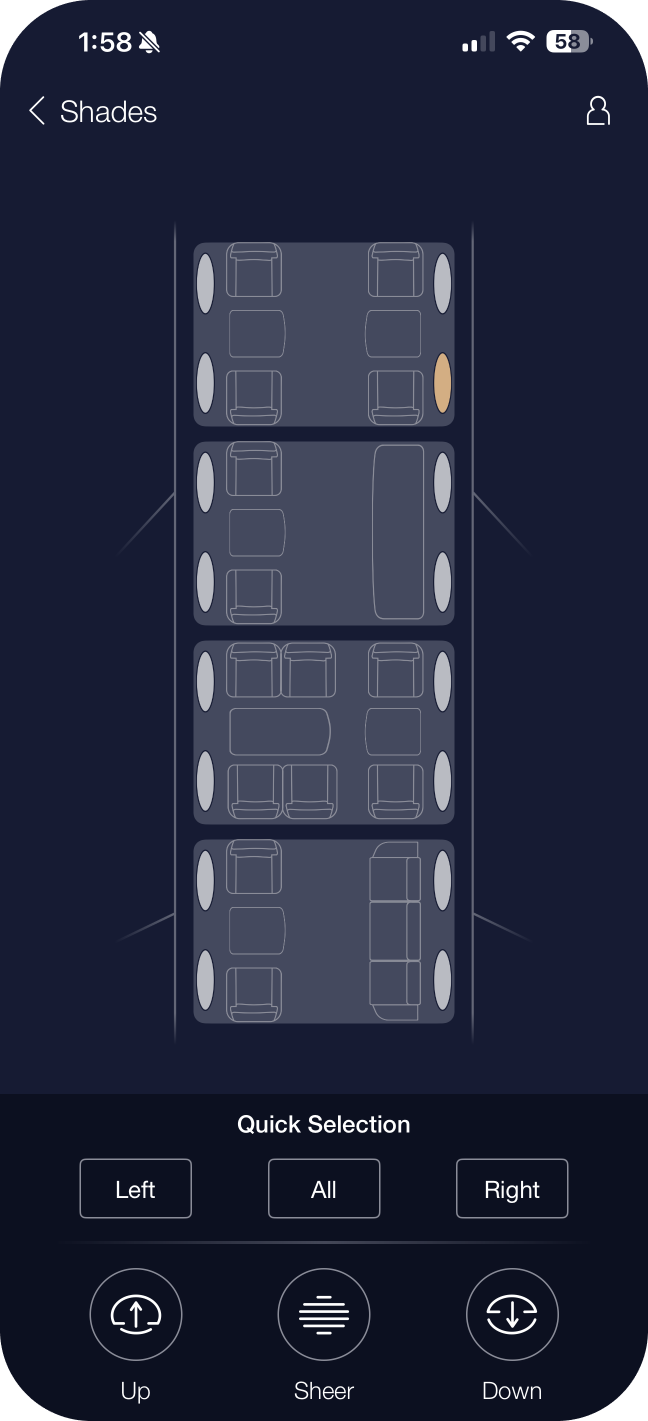
Window shade control screen
Window Shade Controls
Individual and zone shade controls displayed on the live floor plan — open, partial, or closed state visible at a glance.

Key feature areas

Lighting Control

Zone-based and seat-specific lighting with preset moods — Relax, Read, Movie, Sleep, Energise, Dining — plus circadian rhythm scenes on the GTS. Passengers access mood-based presets via the PCU; crew can additionally manage timed scenes, cross-zone ambiance, and the full 2000K–7000K color temperature range.

Climate Management

Temperature control by zone with a visually distinctive heat-map overlay on the floor plan. Steppers replace sliders for precision adjustment in turbulence. The UI references the Gulfstream temperature color system (Red 100 → Blue 80) to reinforce meaning at a glance.

Entertainment Routing

Seat-level media assignment with source selection across Satellite TV, On Demand, Apple TV, Blu-ray, Kaleidescape, SiriusXM, and HDMI inputs. Media states are visually distinguished — selectable, selected, playing, and disabled — using the Gulfstream media color palette for immediate recognition.

Window Shades

Individually selectable shade controls displayed as visual indicators on the floor plan, with a zone-select mode for mass operation. The shade state (open, partial, closed) is previewed in the floor plan overlay so crew can manage the full cabin view without walking the aisle.

System Status & Crew Notifications (GTS)

A persistent status layer in the GTS navbar surfaces Water A / Water B / Waste levels, galley power states, essential power, microwave door status, and TTD — all the operational data crew need at a glance, surfaced in the navbar rather than buried in settings. The PCU shows attendant call notifications; the GTS additionally surfaces electrical system states, internet usage, and advanced cabin controls.

Galley Touchscreen (GTS) — Embedded Crew Interface

Custom certified 10.1" displays embedded in the galley and vestibule. The GTS is the operational hub — crew can access every system from a single interface, with deeper controls than any passenger-facing surface.

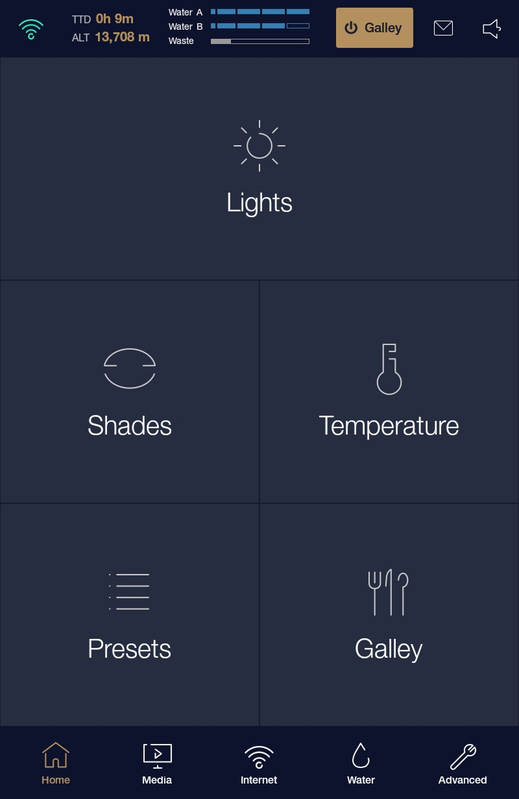
GTS Homescreen

Home Screen

The GTS home gives crew instant access to Lights, Shades, Temperature, Presets, and Galley controls — the six most-used actions on every flight. The spatial layout mirrors the physical cabin zones so crew can orient instantly without training on the interface itself.

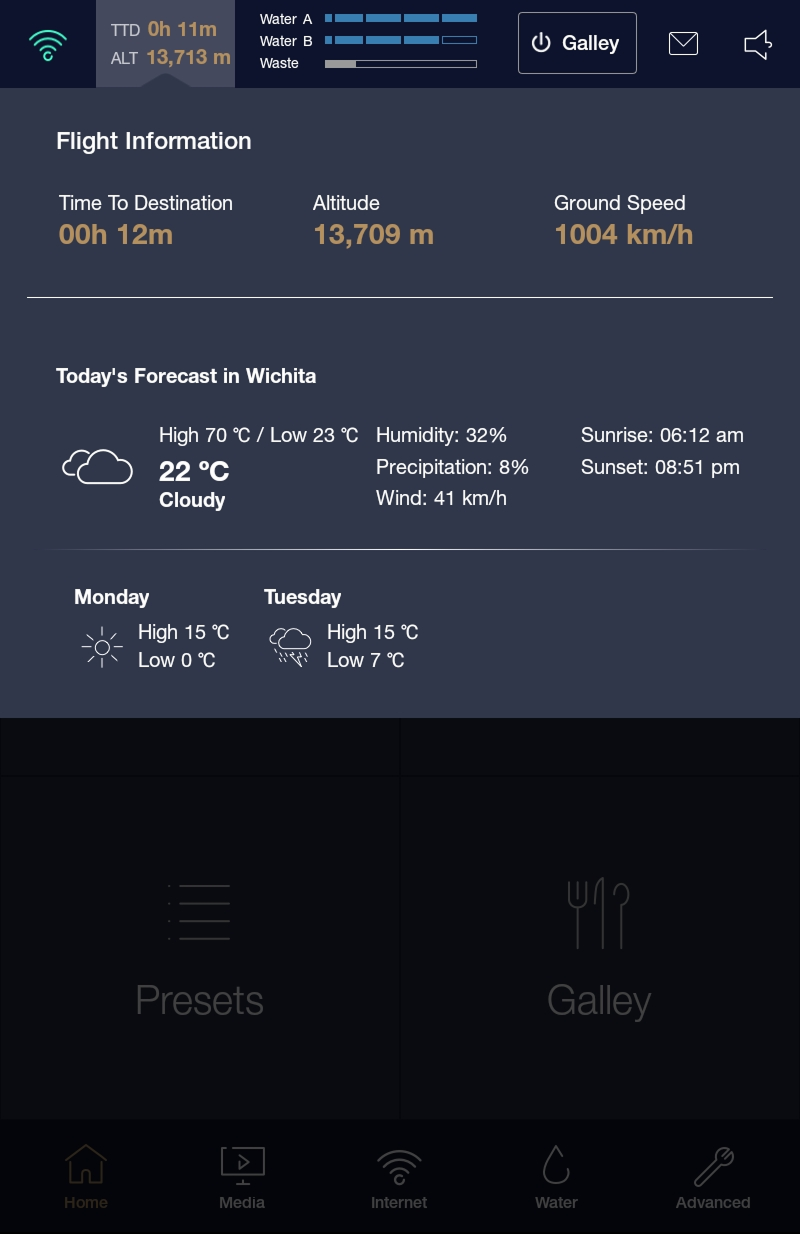
GTS Destination Weather & Internet

Destination Weather & Internet

Real-time destination forecast and internet connectivity management sit together — crew can brief passengers on landing conditions and switch between available satellite internet providers from a single screen.

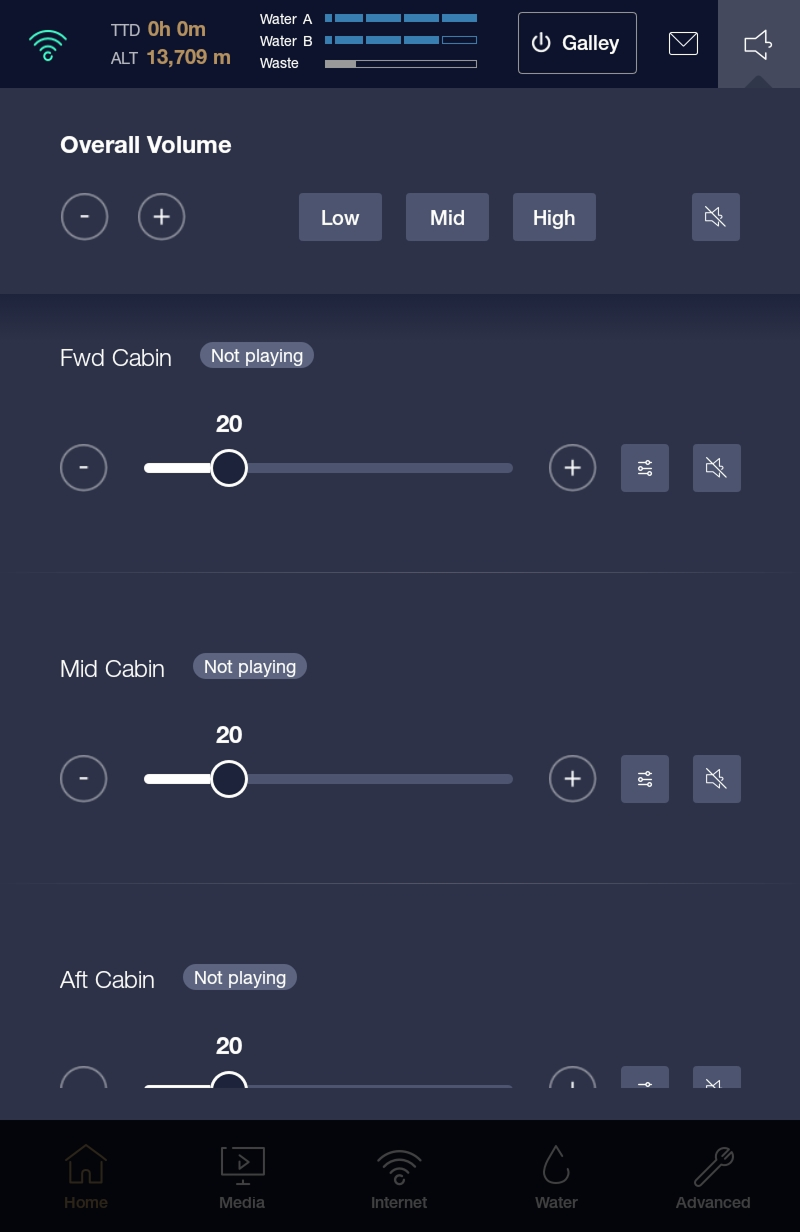
GTS Cabin Sound Control

Cabin Volume Control

Zone-level audio routing with overall cabin volume control and AV source switching. Crew can fade audio between zones, control individual seat headrests, and manage the galley speaker independently.

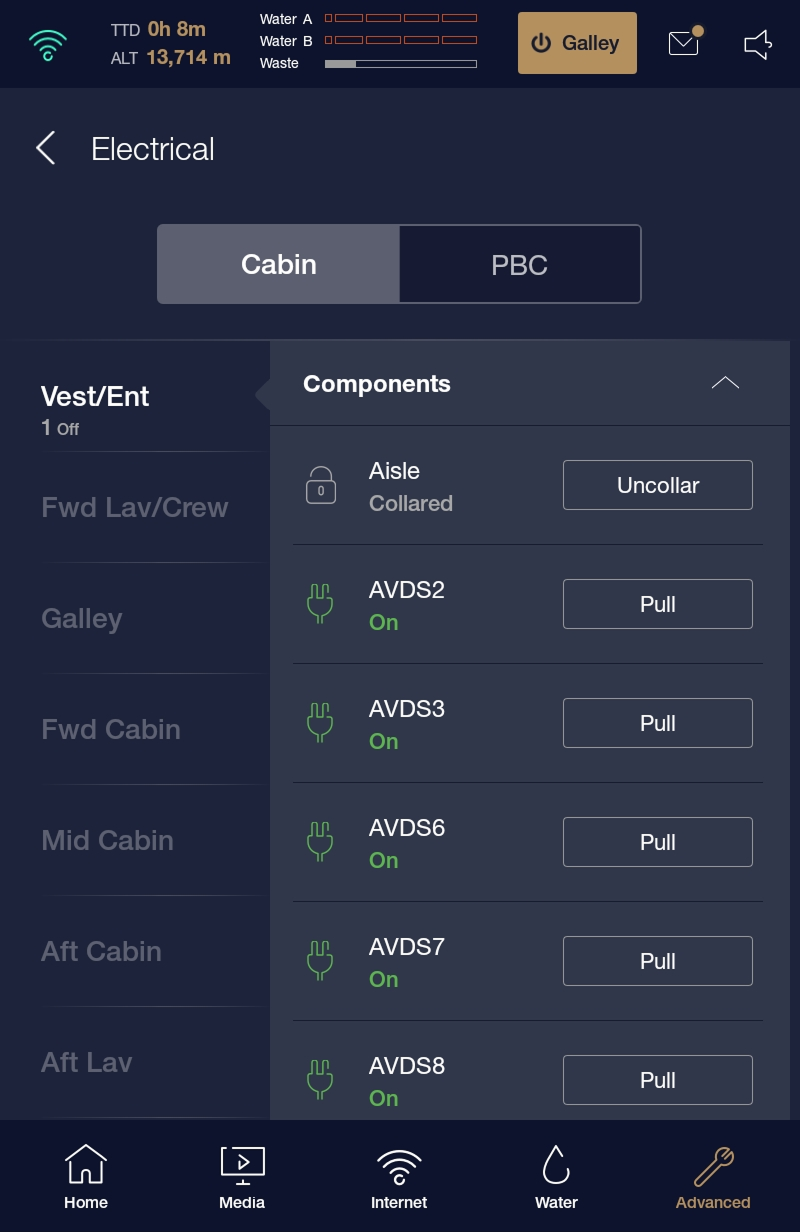
GTS Digital Circuit Breakers

Electrical Circuit Breakers

A digital representation of the aircraft's electrical panel, accessible only by trained crew. This replaces the need to locate physical breakers — crew can identify and reset circuit states from the galley display, with each breaker clearly labelled and status-coded.

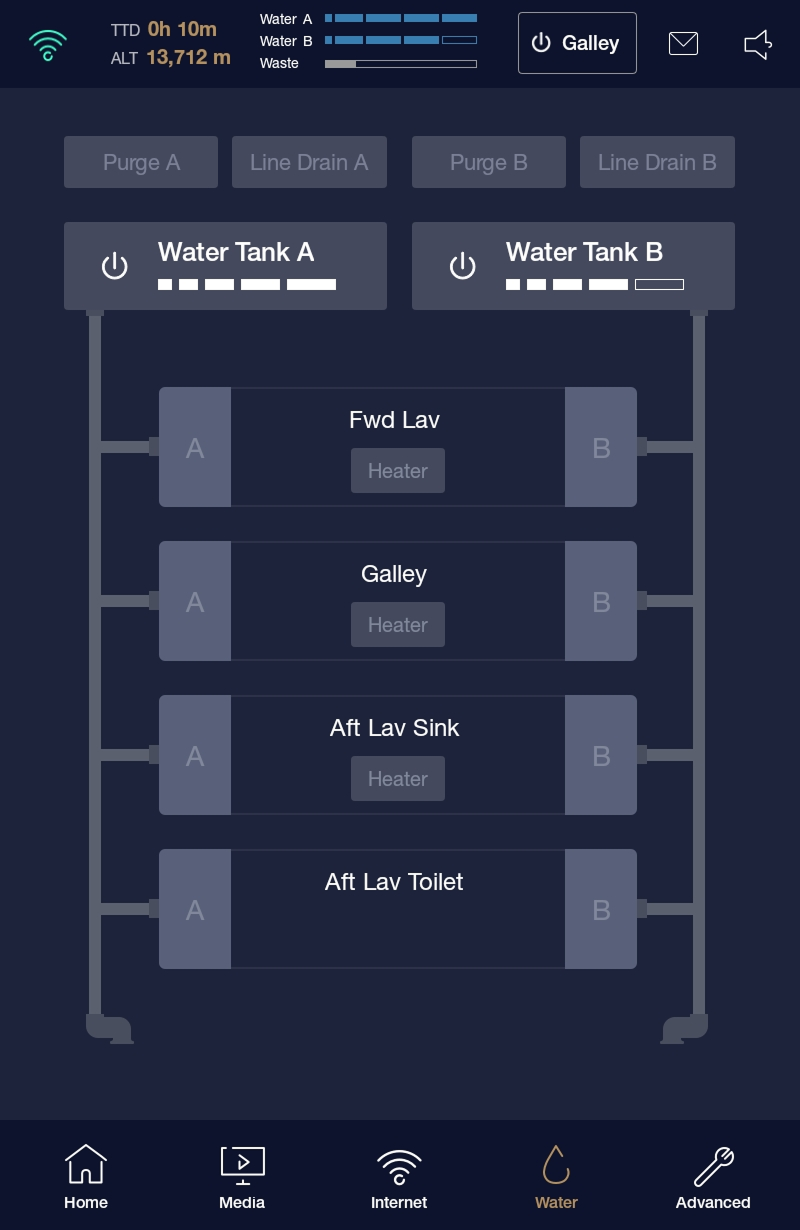
GTS Water Tanks

Water Tank Controls

Live monitoring of Tank A, Tank B, and Waste levels with fill and drain controls. Critical for galley service planning on long-haul sectors — crew can see exactly how much water remains and manage tank states without a trip to the physical service panel.

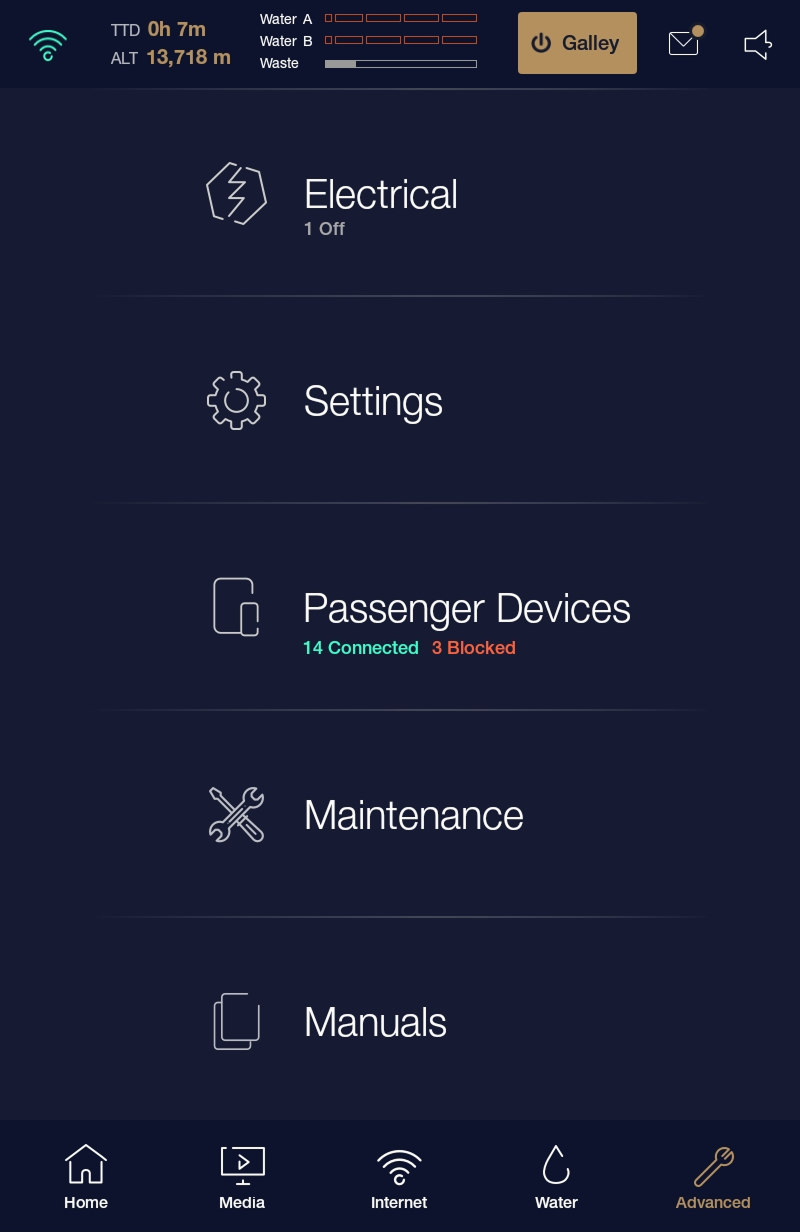
GTS Advanced Settings

Advanced Settings

Passenger device management, aircraft maintenance logs, and system manuals. This layer is protected behind crew authentication and provides the full depth of system configuration — from registering passenger devices to accessing technical documentation in-flight.

PCU — Personal Control Unit

The passenger-facing interface, available on iPhone and Android via the App Store. The PCU gives travellers direct control over their personal environment without crew intermediation — a curated, simplified view of the same systems available on the GTS.

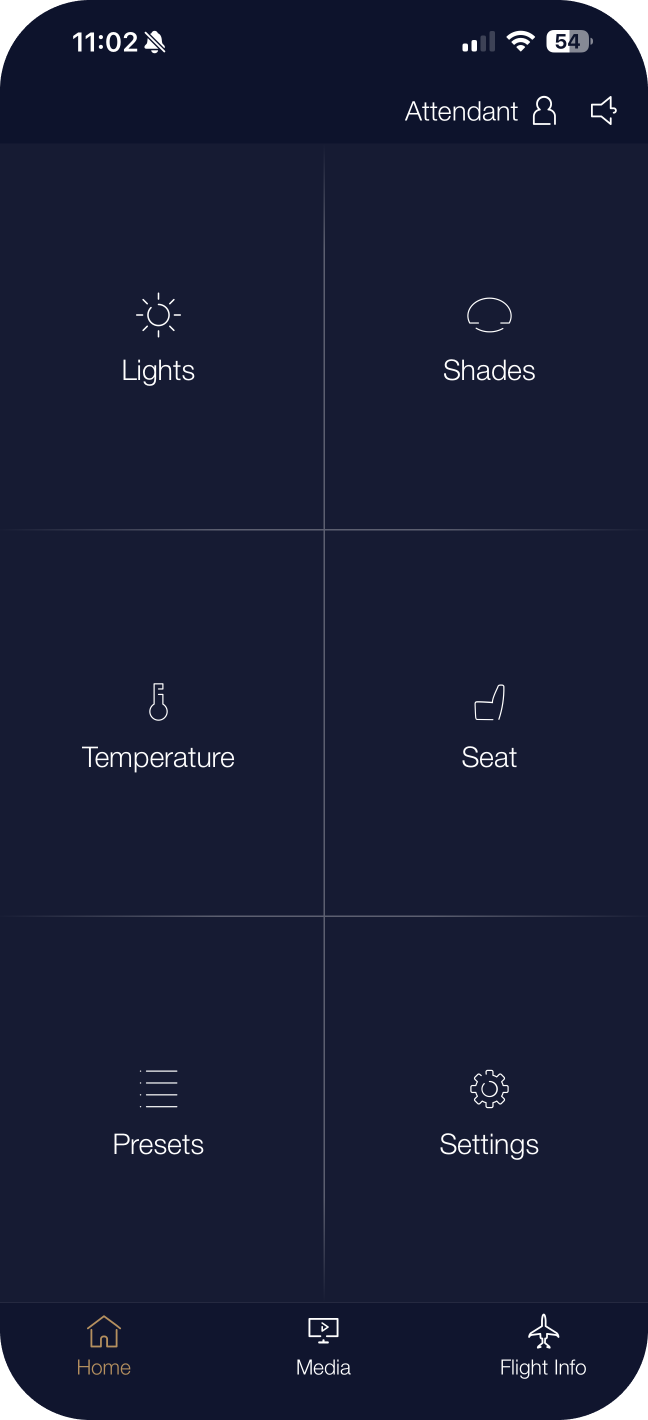
PCU Home Screen

Home Screen

The PCU home gives passengers one-tap access to the six most-used cabin controls: Lights, Shades, Temperature, Change Seat, Presets, and Settings — arranged in a 2×3 grid. No menus. No hierarchy. Everything a passenger needs is one tap from launch.

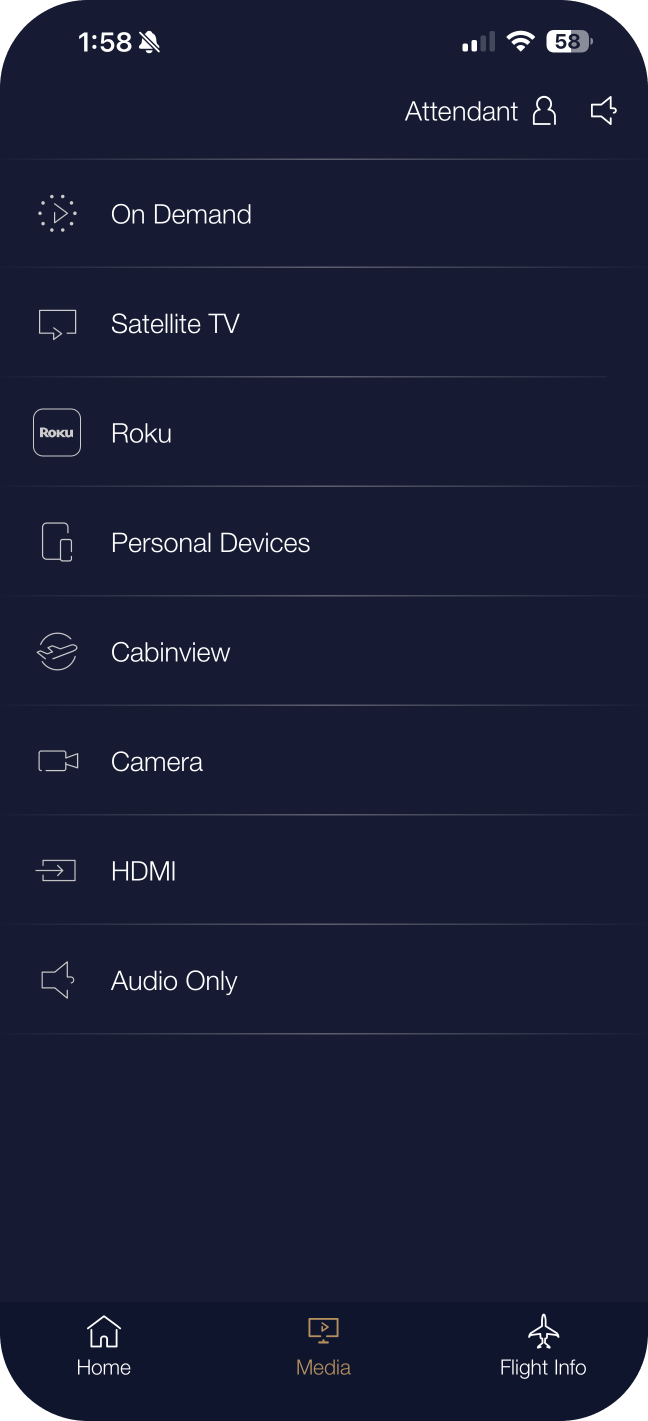
PCU Media Screen

Media

The Media screen routes in-cabin entertainment to the passenger's selected seat-back display. Sources include On Demand, Satellite TV, HDMI, CabinView exterior cameras, and Kaleidescape. Source switching and playback controls sit on a single screen — no physical remote required.

PCU Flight Info

Flight Info

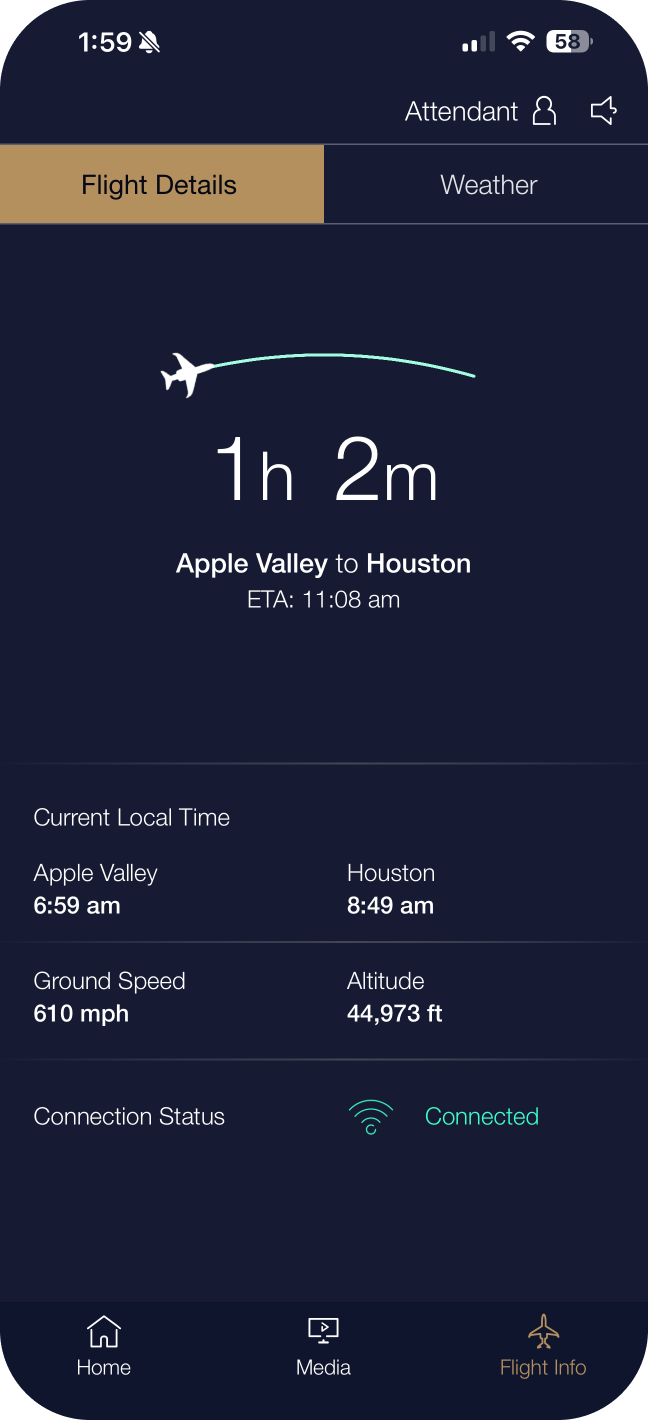
The My Flight tab brings live flight data directly to the passenger's phone. Speed, altitude, ETA, distance to destination, and heading are displayed on a customisable tile dashboard. Destination weather, world clocks, and 2D/3D moving maps are accessible within the same tab.

Design Decision

Why a floor plan, not a menu? Early wireframes used tabbed navigation to access lighting, temperature, and entertainment separately. User testing with crew revealed that this created a dangerous mental model mismatch: crew think in terms of location in the aircraft, not system category. Moving to a spatial floor plan as the primary navigation metaphor reduced task completion time in prototype testing by an average of 34% for crew, and improved first-attempt success rates for seat-level operations from 61% to 89%.

My Cabin · Lighting

Re-imagining the G700 lighting system

Lighting is one of the most powerful — and most overlooked — features within the My Cabin ecosystem. Surfaced through the GTS and PCU interfaces, it gives crew and passengers direct control over an entirely new generation of cabin lighting hardware. On ultra-long-range jets like the Gulfstream G700, passengers may spend 14–18 continuous hours in the air, crossing multiple time zones. The quality, tunability, and responsiveness of cabin lighting has a direct, measurable impact on passenger comfort, circadian health, and the overall perception of the Gulfstream brand.

The necessity for improvement was born out of direct customer feedback on the G500, G600, and G650. The team applied the full design thinking process — empathising, defining, ideating, prototyping, and testing — to deliver the most advanced cabin lighting system in business aviation history.

Empathise — listening to the people who fly

The team combed the squawk list (customer complaints and feature update requests), spoke with Customer Delivery Executives, and conducted structured interviews with internal and external flight attendants and Gulfstream sales executives. Two consistent themes emerged: passengers needed more comfort, and they needed ease of entertainment. From that, the team focused improvement efforts — prioritised in programme schedule order — on Lighting, Seating, and Entertainment.

01

Lighting increment resolution

The existing lighting system offered 300 steps between dim and bright — but critically, those steps were distributed unevenly, with most resolution at higher brightness levels. Passengers and crew repeatedly complained that the lights simply couldn't get dim enough, particularly during landing and sleep phases. One pilot stated directly: "The lights don't dim enough during landing — it's dangerous, I have to turn them completely off, which is disruptive to the passengers." The solution was to redesign the brightness curve to distribute adjustment points evenly at lower levels, giving the system far more precision where it matters most.

02

Circadian rhythm support

A Gulfstream aircraft can travel for up to 18 hours, crossing numerous time zones. This type of travel fatigues passengers in measurable physiological ways. The team asked: how can lighting reduce that stress? The answer was a full-spectrum up-wash and down-wash LED array with a color temperature range from 2000K (deep amber, mimicking sunset) to 7000K (cool daylight), designed to support the body's natural circadian rhythm across the full duration of a long-haul flight. The system can be programmed to follow the actual time of day at the destination — gently preparing passengers' biology for the time zone they're flying into.

03

Seamless zonal blending

The team dreamed of a system that could shape light along the sidewalls and ceiling in ways never before attempted in business aviation. The solution was an individually addressable LED array with 1/32" LED spacing — eliminating hotspots and allowing smooth, continuous light gradients across zones. Adjacent zones blend seamlessly, making a mood transition feel like a natural shift in atmosphere rather than a stepped change across a visible boundary.

04

User-intent interface design

The most technically capable lighting system ever put in a business jet still needed an interface that anyone — a first-time Gulfstream passenger, a relaxed guest on a leisure trip — could operate with total confidence. Rather than surfacing color pickers, kelvin sliders, and brightness percentages, the design team reframed the question entirely: instead of asking users to configure a lighting system, ask them what they want to experience. The result was the Moods and Scenes interface — a mood-first control paradigm where the system does the technical heavy lifting invisibly.

Customer Advisory Board — Validation at scale

Twice a year, Gulfstream brings in 40–70 participants who use Gulfstream aircraft on a consistent basis: flight attendants, pilots, directors of maintenance, flight directors, and personal assistants to aircraft owners. The team built full-scale physical mockups with the new R&D-prototyped lighting (four 105" sections), paired with survey kiosks so each participant could record their response immediately after experiencing each exhibit.

100%
Believe the new lighting is a superior product to anything currently offered in the fleet
72%
Customers who consistently use the preset/mood feature through the digital product offering
60%
Stopped the presentation mid-session to ask when they could have the system on their own aircraft
65k+
Steps of brightness resolution — vs. 300 in the previous system and competitive aircraft

65,000+ Steps of Smoothness

The previous Gulfstream system and all competitive aircraft offered approximately 300 brightness steps. The new system delivers over 65,000 — giving crew and passengers an essentially infinite gradient of light, with the precision to hold exactly the level they want.

0.1%–100% Dim Range

The dimmest lighting system available in any business aircraft. 0.1% produces a barely-perceptible glow — enough for safe cabin navigation during complete darkness — without disturbing sleeping passengers or disrupting pilot dark adaptation during approach.

1/32" LED Spacing

Individual LEDs spaced at 1/32" eliminate hotspots and bright spots entirely. Light blends so smoothly along the sidewall and ceiling panels that passengers cannot identify where one zone ends and the next begins — a first in business aviation.

2000K – 7000K Range

From deep amber candlelight at 2000K through neutral daylight at 5000K to cool sky at 7000K, the full spectrum of the human experience of natural light. The system can automatically follow a circadian programme tied to the destination time zone for the full flight duration.

Even though this lighting system was the most complicated and capable ever devised for a business aircraft, the team's non-negotiable goal was to provide a simple, intuitive solution for control. The key design insight was to shift from a parameter-based model (brightness %, color temperature K) to an intent-based model: how does the passenger want to feel?

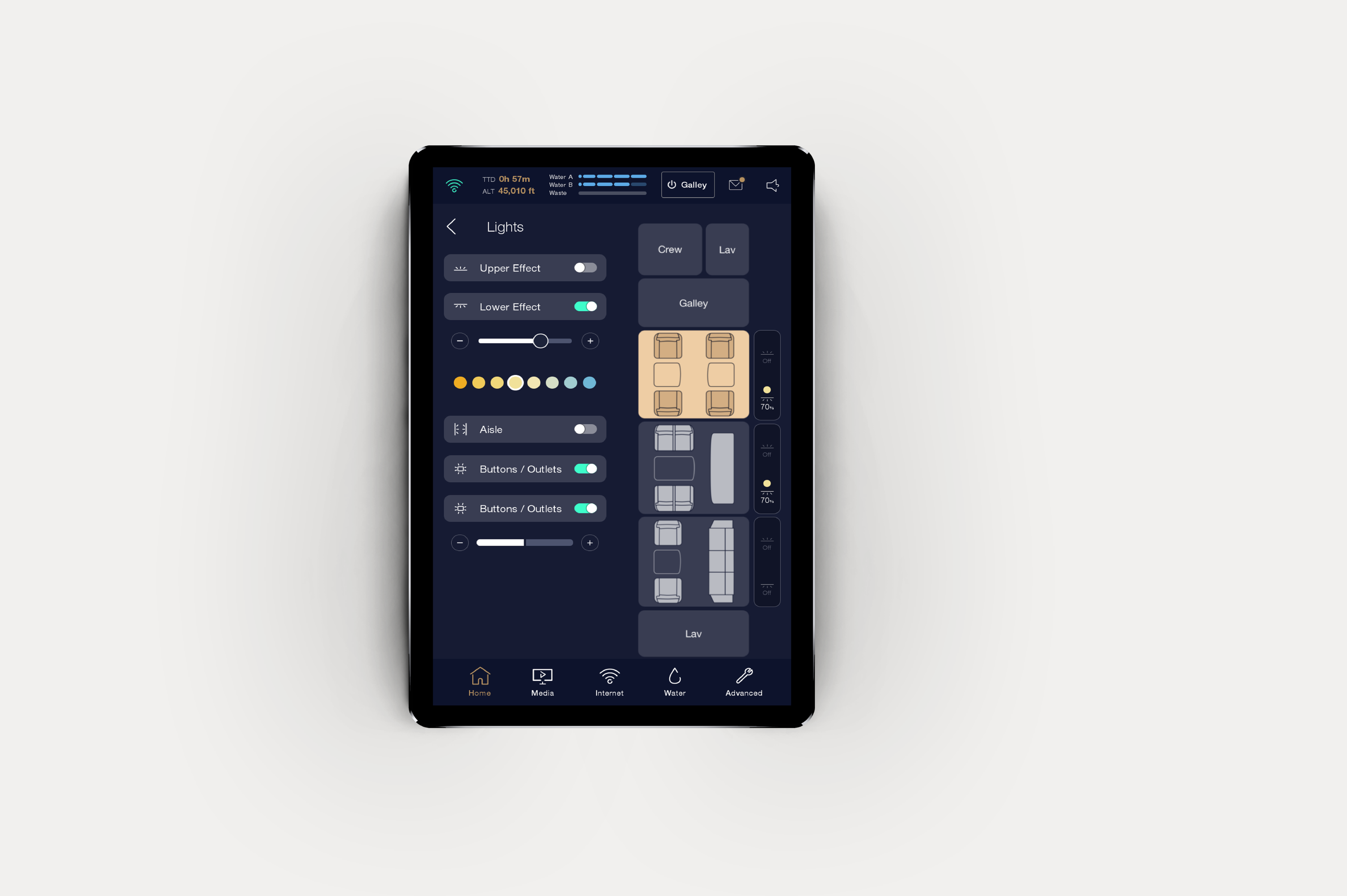
GTS Lighting Controls — crew interface showing Upper/Lower Effect, color temperature swatch and zone floor plan

GTS — Galley Touchscreen

The GTS lighting screen gives crew full control over Upper and Lower Effect LEDs, color temperature via the warm-to-cool swatch row, zone controls overlaid on the live floor plan preview, plus Aisle and Buttons/Outlets toggles. Changes apply instantly across the cabin.

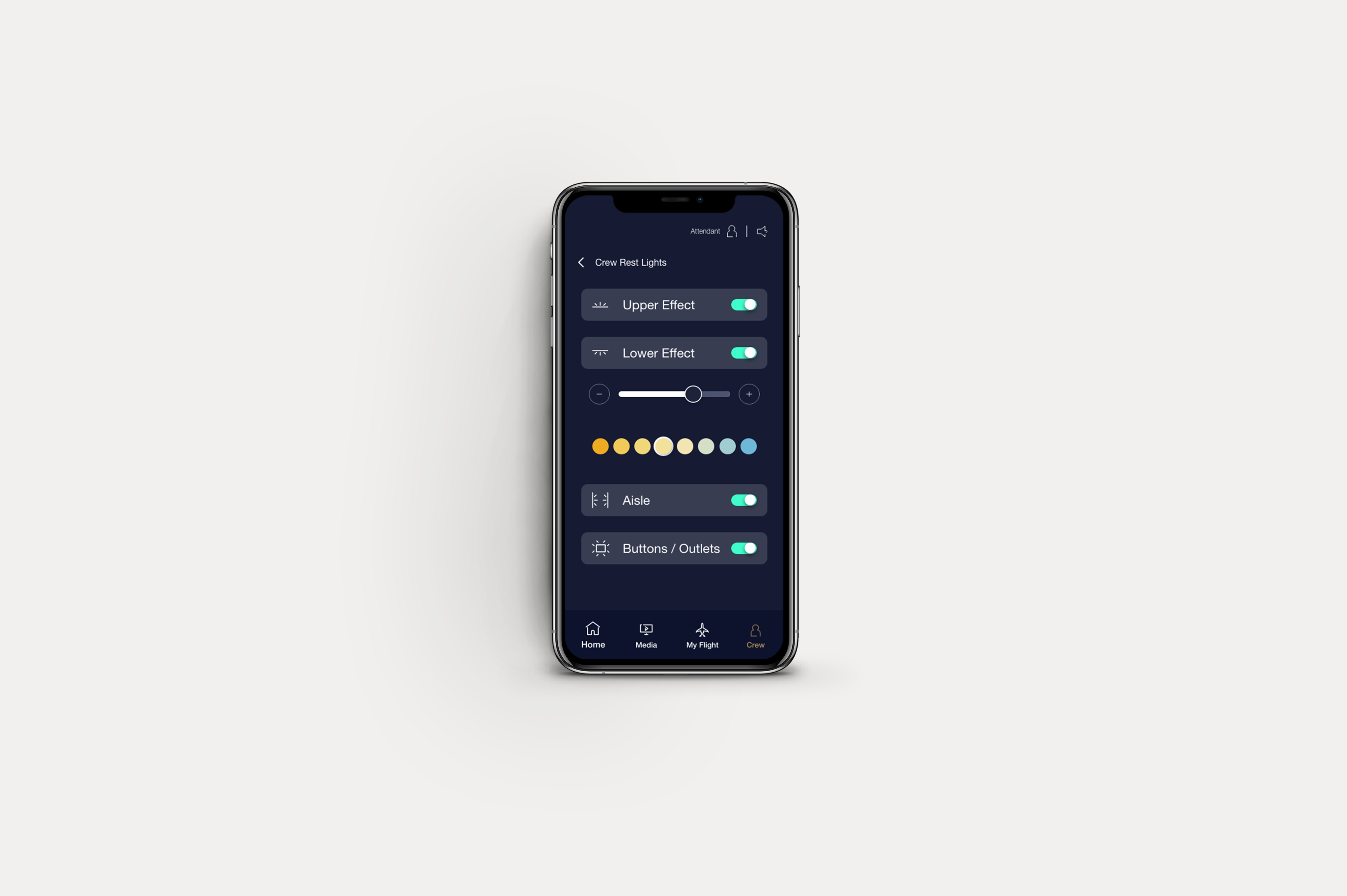
PCU Lighting Controls — passenger iPhone showing Upper/Lower Effect toggles, brightness stepper and color temperature row

PCU — Personal Control Unit

The passenger-facing PCU mirrors the full GTS lighting capability in a phone-optimised layout: Upper and Lower Effect toggles, a brightness stepper, the complete color temperature swatch row, and individual zone toggles. Simple for passengers, powerful enough for crew.

My Cabin · Wearable

At a glance, on the wrist

The Wearable is a companion feature within the My Cabin ecosystem, extending to Apple Watch, giving crew members quick access to the most time-critical information and controls without requiring them to retrieve a tablet. On a moving aircraft, the difference between a glanceable wrist notification and a retrieved iPad can be measured in passenger experience.
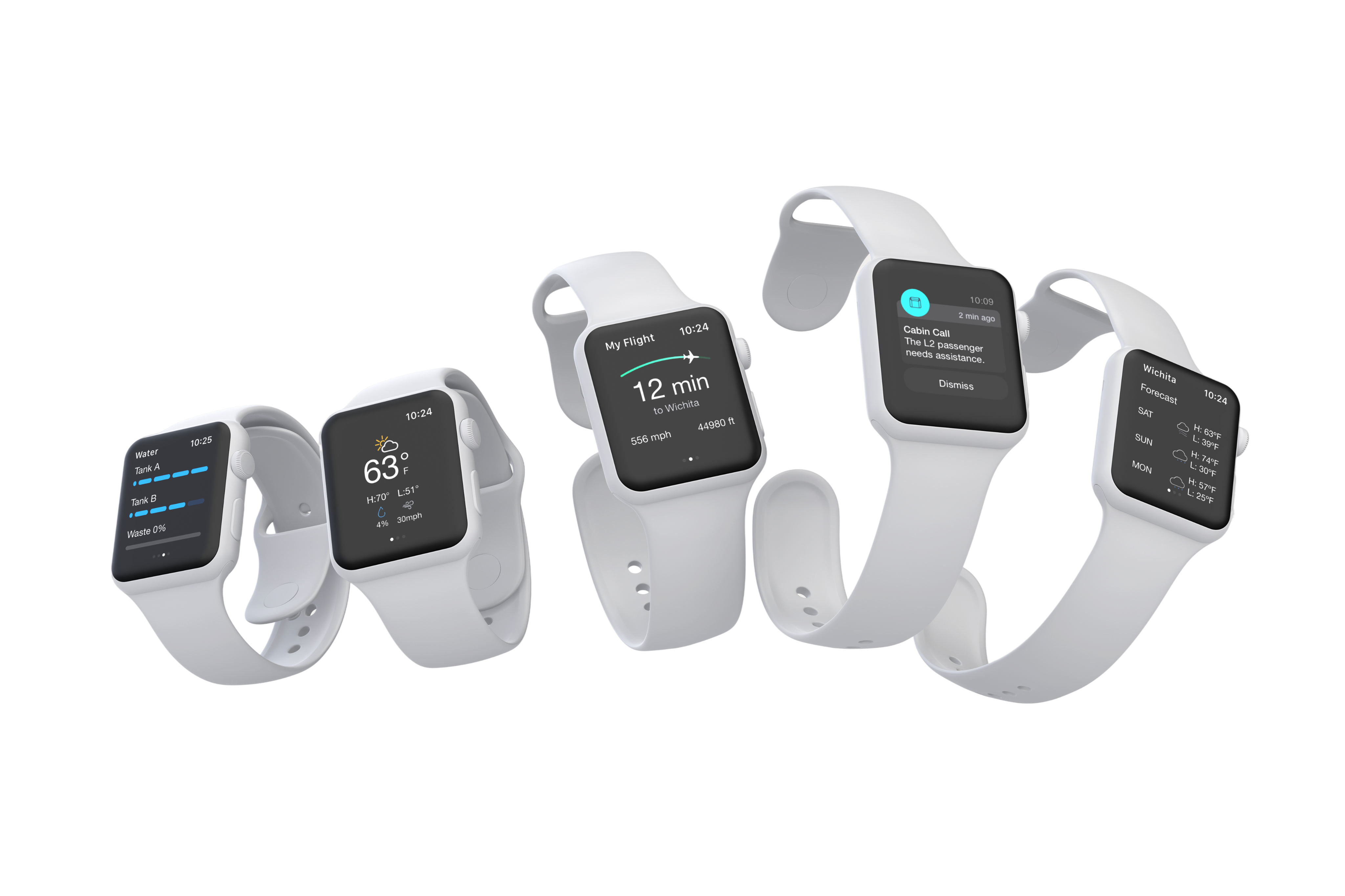
It serves as a situational awareness tool: a crew member moving through the cabin can see flight status, incoming attendant calls, and critical system alerts without breaking stride — scoped only to the interactions that genuinely benefit from wrist immediacy.

Apple Watch — My Cabin wearable companion showing flight status and attendant controls

Core wearable features

01

Real-time flight details

TTD (Time to Destination), altitude, ground speed, and ETA — surfaced in a glanceable layout optimised for the Apple Watch display constraints defined in the Gulfstream style guide (iOS wearable: 184×224px).

02

System status alerts

Watch Alert notifications for galley events, door status, lavatory occupancy, and essential power state — using the six watch alert icons defined in the design system with distinctive color coding for rapid triage.

03

Destination weather

Current conditions at the destination airport — temperature, conditions, and wind — giving crew advance notice for passenger briefings and post-landing logistics without requiring them to open a separate application.

04

Attendant call management

Instant notification of passenger call requests, with seat location context so crew can respond efficiently. Dismissing a call from the watch logs the response, maintaining crew accountability records.

UX Research Finding

Study context: In a contextual inquiry study with 6 crew participants simulating a 4-hour transatlantic sector, crew retrieved their tablet an average of 23 times for status checks that required no action — simply verifying flight progress or system state. Introducing the wearable prototype reduced unnecessary tablet retrieval by 68% in the follow-up session, and crew rated their confidence in cabin awareness significantly higher. The wearable did not replace the tablet for any operational task; it eliminated the friction of retrieval for passive information needs.

Design constraints & decisions

Scope discipline

Every proposed wearable feature was evaluated against a single criterion: does this genuinely benefit from wrist immediacy, or is it simply a miniaturised version of the tablet? Features that failed this test — such as zone-level lighting control — were deliberately excluded to keep the wearable experience focused and coherent.

Touch target sizing

Apple Watch touch targets were designed at a minimum of 44pt × 44pt, with deliberate padding beyond the minimum for alerts and dismissal actions — recognising that a crew member responding to a notification may be standing, moving, and under time pressure simultaneously.

Color system alignment

Watch alert states used the full Gulfstream watch alert color palette (purple, green, teal, blue, amber, orange) mapped consistently to the same system states as the tablet application — ensuring that a crew member who learned the color language on the iPad could immediately read it on the watch.

Connectivity resilience

The wearable was designed to degrade gracefully when connectivity to the aircraft network was intermittent — displaying the last-known state with a clear freshness indicator rather than showing a confusing blank or error state that a crew member might misinterpret as a system failure.

UX Research

Validating against the real world

Research for the Gulfstream My Cabin ecosystem was conducted across multiple rounds, spanning contextual inquiry with cabin crew, usability testing with passenger proxies, and accessibility evaluations against the unique perceptual environment of a pressurised aircraft cabin. All study design, participant recruitment coordination, and insight synthesis was led by the design team in partnership with Gulfstream's UX stakeholders.

24
Participants across all research rounds
3
Research methodologies: contextual inquiry, usability, A/B
89%
First-attempt task success rate post-floorplan redesign
68%
Reduction in unnecessary tablet retrievals with wearable companion

Research Study 1 — Crew Contextual Inquiry

A contextual inquiry was conducted with 8 active cabin crew members from charter operators and private aviation companies, simulating a full flight sector from departure preparation through landing. Participants were observed managing a mock cabin using both the legacy physical panel system and an interactive My Cabin prototype.

"The hardest part of my job isn't managing passengers — it's managing information. I need to know what's happening in the whole cabin at once, not walk to a panel in the galley."

— Cabin Crew Participant, Contextual Inquiry Study 1
● Critical

Information fragmentation

Crew reported that legacy panel systems required physical displacement to access information — a significant friction point during service. The inability to see the whole cabin state from a single location was the most cited source of cognitive load.

● Critical

Navigation-by-category mismatch

Early tab-based navigation organised controls by system type (Lighting, Climate, Entertainment). Crew consistently navigated by location intent — "I want to change the forward galley" — not by system intent. The floor plan metaphor resolved this fundamentally.

● Major

Confirmation anxiety

Crew were hesitant to commit actions — particularly global lighting changes and shade operations — without a preview of the result. Adding live preview states (with animated transitions showing the change before confirmation) significantly reduced hesitation time.

● Major

Attendant call latency tolerance

Crew expected attendant call notifications to appear within 2 seconds of a passenger pressing the call button. In testing, notification latency above 3 seconds caused crew to check the system rather than trusting it — increasing cognitive load rather than reducing it.

● Minor

Touch target sizing in turbulence

At 40pt touch targets, crew error rates in turbulence simulation increased by 22% versus 56pt targets. The final design uses 56pt minimum for all actionable controls, with the GTS button system providing clear visual affordance at appropriate sizes.

● Minor

Night mode adoption

Crew working during dark flight phases found standard display brightness disruptive to their own dark adaptation. A night mode with deep navy backgrounds and gold accent preservation was added and became one of the highest-rated features in post-launch feedback.

Research Study 2 — Passenger Usability

A moderated usability study with 12 participants representing frequent private aviation passengers tested the My Flight and passenger My Cabin interfaces. Tasks included locating flight information, adjusting personal comfort settings, and discovering Points of Interest at the destination. The study was conducted on representative device hardware at 1:1 scale to accurately simulate the in-cabin experience.

"I'd actually use this. I now don't have to interact with the crew, this has improved my overall flight experience."

— Frequent Private Aviation Passenger, Usability Study 2
● Critical

Map mode preference split

Passengers were roughly equally divided between 2D and 3D map preference — with 2D favoured for flight path clarity and 3D favoured for emotional engagement. This validated the decision to offer both modes rather than committing to one, and informed the default state (3D) based on first-impression testing.

● Major

Destination weather primacy

When asked what information they most wanted from a flight app, 9 of 12 participants mentioned destination weather unprompted — well ahead of flight statistics. The information architecture was revised to surface weather more prominently in the destination tab.

● Major

World clock confusion

Initial world clock designs showed three time zones simultaneously with equal visual weight. Participants consistently reported confusion about which time was "now" for their body clock. Redesigning the current-location clock to be significantly larger and more prominent resolved the issue completely in the follow-up round.

● Minor

Points of Interest curation expectations

Passengers expected POI data to be curated for their demographic — luxury hotels, fine dining, private airport lounges — rather than generic tourist attractions. Partnership with a premium POI data provider and manual editorial curation for top routes was recommended as a post-launch enhancement.

Research Methodology Note

All usability studies were conducted under facilitated moderation with think-aloud protocol. Device brightness was calibrated to match typical cabin lighting conditions across three scenarios: full daylight, dusk, and dark cabin.

Design System

A system built for altitude

The Gulfstream design system was engineered as a full design language spanning color, typography, icons, layout grids, components, and interaction patterns across every surface the ecosystem touches. It is not a component library — it is a brand system that happens to produce components. Every token was validated for accessibility against the deep navy backgrounds that define the Gulfstream aesthetic.

Color System

Built around Main Blue and Gold as brand anchors, with a full state-color system for interactive feedback.

Dark Blue
#0D132C
Main Blue
#161B33
Blue 400
#393D52
Blue 300
#5C5F70
Blue 200
#8B8D99
Blue 100
#B9BBC2
Blue 50
#E3E4E7
Blue 25
#EFF0F3
Gold 400 — Selected
#B5905F
Gold 200
#D3AE83
Gold 100
#EECDA4
Gold 700
#9F7843
Green — Playing
#3EFDCA
Red 400 — Error
#FD613E
Warning
#D6A407
Pending
#FD903E
Satellite TV
#3D54A8
On Demand
#00A8FE
Apple TV
#54DAFE
HDMI
#4ED777
Blu-Ray
#B984ED
Camera
#FF5D72
SiriusXM
#FD613E
CabinView
#FFA90E
Kaleidescape
#FFDD3E

Typography

The Horizon typeface anchors all UI text in the Gulfstream system, paired with Helvetica Neue for body copy across all platform targets.

Display / CTA
Horizon Regular — Button Label
UI Medium
Helvetica Neue Medium — 18pt Navigation
Body
Helvetica Neue Regular — Body copy, descriptions, and secondary information used throughout the Gulfstream cabin interface.
Label / Code
SYSTEM STATUS · TTD 4H 28M · ALT 48,488 FT

State System

Every interactive element in the system uses a consistent three-state model — Enabled, Pressed/Disabled, Selected — color-coded with the appropriate token for immediate recognition.

● Playing● Selected● Error● Warning● Off● Blue Water● Pending

Button System (GCMS)

Four sizes (X-Small 40px → Large 70px), Primary and Secondary variants, across light and dark surface contexts. Selected state always uses Gold 400 (#B5905F).

Primary Buttons
Secondary Buttons

Icon Language

A bespoke aviation-context icon set at sizes 16–48px in Regular (1px stroke) and Bold (2px stroke) weights. Over 80 icons spanning home, system status, media controls, climate, and navigation — all built on a consistent grid.

System Coverage

The design system covers every device target in the product ecosystem — from the GTS galley display at 1280×800 and iPad Pro at 1366×1024, down to iPhone at 375×812 and Apple Watch at 184×224. Grid specifications, button sizes, font scales, and touch targets are individually tuned for each breakpoint. The system was built once and applied everywhere — with intentional adaptations rather than arbitrary compromises.

Layout Grids

Device-specific grid specifications ensure every surface has appropriate security margins, column widths, and gutters — none carried over from a desktop assumption.

GTS — 1280 × 800

Security Margin: 48px
Column: 74px
Gutter: 26px
12-column landscape grid

My Cabin iOS iPad — 1366 × 1024

Security Margin: 22px
Column: 60px
Gutter: 24px
Landscape + portrait supported

PCU — iPhone 375 × 812

Security Margin: 15px
Column: 50px
Gutter: 9px
Portrait primary · landscape portrait mode only

Wearable — iOS 184 × 224

Security Margin: 9px
Column: 36px
Gutter: 7px
Android: 250 × 250px circular

Navigation System

The bottom navigation bar is specified individually per device, with font weights, bar heights, and item counts all tuned for the viewing distance and interaction context of each surface.

Modal & Snackbar Sizing

GTS Modal

Min height: 560px
Max height: 600px
Same sizes for landscape orientation

My Cabin iPad Modal

Min height: 270px
Max height: 524px
Same sizes for landscape orientation

PCU iPhone Modal

Min height: 190px
Max height: 400px
Portrait only

Snackbar Heights

GTS / G280: 80px
iPad portrait / landscape: 106px
iPhone: 94px · Android phone: 60px

Learnings

What I'd carry forward

Spatial metaphors beat categorical ones in operational contexts

The decision to lead with a floor plan rather than a navigation menu was the single highest-impact design choice in the project. When users are operating in physical space — as crew always are — anchoring the interface to that space dramatically reduces the cognitive work of translating between "what I want to do" and "where in this UI I do that." I apply this principle immediately now in any operational or field-use product context.

Wearables require ruthless scope discipline

The most valuable design work on the wearable was the work we chose not to do. Every feature that didn't genuinely benefit from wrist-immediacy was cut, regardless of how useful it seemed on paper. The resulting app is better for its constraints. I've learned to ask "does this earn the wrist?" before designing any wearable feature.

Luxury UX is about absence, not addition

The Gulfstream brand taught me that the highest expression of luxury in a digital interface is the removal of friction, not the addition of features. Every modal confirmation, every loading state, every unclear label is a luxury brand failure. The aspiration is an interface that feels inevitable — where every action simply works, and the technology becomes invisible.

Design for two users simultaneously — but never confuse them

Serving crew and passengers from a shared design system while maintaining entirely separate mental models for each was the most technically complex design challenge of the project. The solution — role-based views surfacing different capability sets on the same underlying interface — taught me that good role-based design is invisible to each user. Neither crew nor passenger should feel like they're using a "limited" version of something; each should feel they have exactly what they need.

← All workMade with sparkling water, good music, and the belief that complex things can feel simple.